Natural Language Processing(NLP) Salesforce Integration

This article will provide an overview of how Natural Language Processing (NLP) Artificial Intelligence (AI) algorithms can be used and Integrated into your Salesforce Org.

NLP Overview

NLP used machine learning algorithms based on provided text to determine the context and sentiment.

Context Analysis will review the major words used in a text string and determine the subject, verb, adj etc. There are many APIs that provide this service, such as IBM Watson, Microsoft Cognitive Service, Wit, Metamind, and Google Cloud. It just depends, how much context you need. Some services like Google, can be fed and unlimited stream of text, like a Contract Document, and provide a summary, or ambiguities. Others are better at simple phrases.
     Sentiment Analysis will review the overall tone of of the text provided. It will return a           score of -1 to 1, -1 being negative, and 1 being positive.

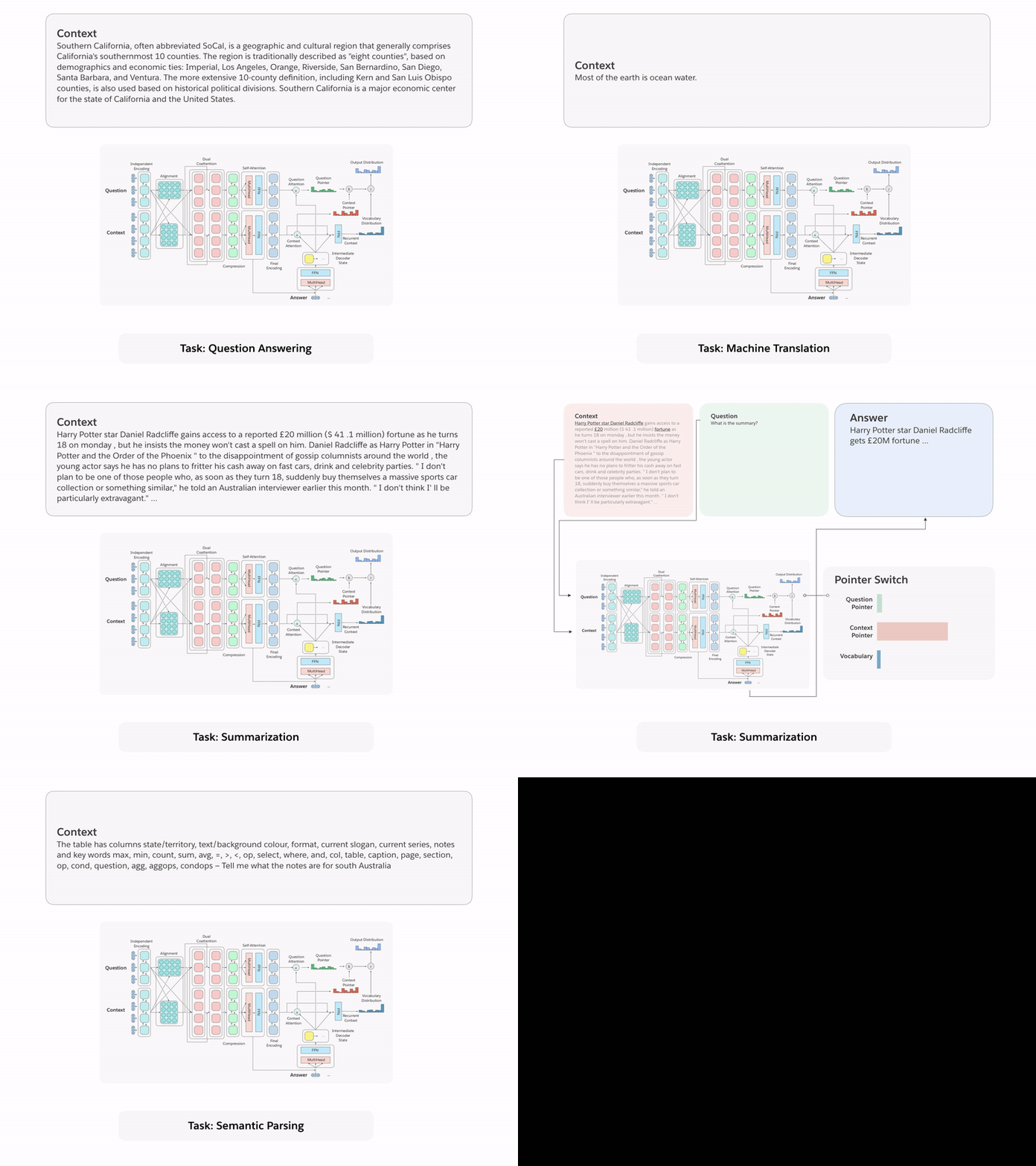
decanlp_fig1

Application of  NLP
Lead/Contact/User Personality Profiles

With the mix of Context and Sentiment Analysis, we can create personality profiles for any Lead, Contact, or User. We can use any type of text input: Email, Chatter, Voice (Voice to Text Twillio integration), Social Media (Twitter, Facebook, LinkedIn, etc.).

Uses for this type of analysis are endless:

- Determine best day and times to follow up with leads/contacts.

- Determine best methods to communicate with leads/contacts/users.

- Employee background checks

- Employee performance reviews.

Tone Check

Tone check would add another layer of professionalism to all outgoing communications in your company. Similar to Spell Check, that looks for misspelled words, Tone Check would tell you the overall Tone of the email, text, phone calls or chatter. We can also include validation rules to warn or prevent certain phrases that have a negative tone from being sent to a client. This way you can monitor all communications with clients and ensure sales and customer service upholding your company’s branded image.

We can also include predictive algorithms to suggest alternative words for the selected phrases that does match the tone you are trying to achieve.

Escalating Service Request

Service requests, phone calls, emails chains, and web chats, can all be analyzed with sentiment analysis in real time, thereby allowing issues to be escalated to senior support reps to handle unhappy customers. This can also be used to remove or warn a support rep who is using a negative tone with a customer.

Reference  Links: https://github.com/salesforce/decaNLP


Share:

Territory Management in Apex

Territory management is account sharing system that grants access to accounts based on the characteristics of the accounts. It enables your company to structure your Salesforce data and users the same way you structure your sales territories.
If you want to use territory management in Apex then you should read this document for limitations and territory functionality in Apex.

Relationships among Territory, Account, Opportunity and User objects:
a) A territory can have an unlimited number of users, and a user can be assigned to an unlimited number of Territories.
b) A territory can have an unlimited number of accounts, and an account can be assigned to an unlimited number of territories.
c) An Opportunity can only be assigned to a Territory.

Territories in Opportunity object:

Problem:
If you want to access the territory field of Opportunity in Apex you can access it easily. Because the field Territory on Opportunity object is exactly present in Opportunity object.

Solution with Example Code:
/*
Author: @Nikunj Sabhaya
Purpose:
    (a)To populate Parent Territory Name and Territory User Name of assigned Territory of Opportunity.
*/
trigger OpportunityTrg on Opportunity (before insert) {
    if(Trigger.isBefore){
        /* Declaration of collection data types */
        Set<Id> setOfTerritoryIds = new Set<Id>();

        for(Opportunity oppty : Trigger.New){
            if(Trigger.isInsert){
                if(oppty.TerritoryId != null){
                    setOfTerritoryIds.add(oppty.TerritoryId);
                }
            }
        }

        /*
            (b)To populate Parent Territory Name of assigned Territory of Opportunity.
        */   
        if(setOfTerritoryIds.size() > 0){
            Map<Id, Territory> mapOfTerritory = new Map<Id, Territory>([Select t.RestrictOpportunityTransfer, t.ParentTerritoryId, t.OpportunityAccessLevel, t.Name, t.MayForecastManagerShare, t.Id, t.ForecastUserId, t.Description, t.ContactAccessLevel, t.CaseAccessLevel, t.AccountAccessLevel From Territory t Where Id IN :setOfTerritoryIds]);
        }
    }
}


Territories in Account object:

Problem:
If you want to access to the Territories field on Account then you need to do extra work. Because Territories field on Account is not present in Account object. You have to query in different objects to get the assigned territory of Account.

Algorithm (Pseudo Code):
1) Query AccountShare object where AccountId = Trigger.New (Account Ids)
where RowCause = 'Territory' (Note: If Account has assigned via Territory Assignment Rules).
where RowCause = 'TerritoryManual' (Note: If Account has assigned via “Manually Assigned Accounts” related list on Territory detail page or AccountShare record has created in Apex Code).
2) Query Group object where Id = AccountShare.UserOrGroupId
3) Query Territory object where Id = Group.RelatedId
4) Query UserTerritory object where Id = Territory.UserId


Solution with Example Code:
/*
Author: @Abrar Haq
Purpose:
    (a)To populate Parent Territory Name and Territory User Name of assigned Territory of Account.
*/
trigger AccountTrg on Account (before update){
    if(Trigger.isBefore){
        /* Declaration of collection data types */
        Set<Id> setOfAccountIds = new Set<Id>();

        for(Account acct : Trigger.New){
            if(Trigger.isUpdate){
                if(acct.Id != null){
                    setOfAccountIds.add(acct.Id);
                }
            }
        }

        /*
            (b) To populate Parent Territory Name of assigned Territory of Opportunity.
        */   
        if(setOfAccountIds.size() > 0){

        /* Declaration of collection data types */
Map<Id, Id> mapOfAccountShare = new Map<Id, Id>();
       Map<Id, Id> mapOfGroup = new Map<Id, Id>();
       Map<Id, Territory> mapOfUserTerritory = new Map<Id, Territory>();


(1)

//Query in Account Share object
    /*
    Those Accounts which are assigned via Territory Assignment Rules.
You can query those Accounts by filtering RowCause = 'Territory' in AccountShare object query.
    */
    List<AccountShare> listOfAccountShare =
    [Select Id, UserOrGroupId, AccountId from AccountShare where RowCause = 'Territory' and AccountId IN :setOfAccountIds];

    //Query in Account Share object
    /*
    Those Accounts which are assigned via Manually Assigned Accounts related list on Territory detail page or create an AccountShare record in Apex code.
    You can query those Accounts by filtering RowCause = 'TerritoryManual' in AccountShare object query.
    */
    List<AccountShare> listOfAccountShare =
    [Select Id, UserOrGroupId, AccountId from AccountShare where RowCause = 'TerritoryManual' and AccountId IN :setOfAccountIds];

//Map of Account Share
    for(AccountShare acctShare : listOfAccountShare){
    mapOfAccountShare.put(acctShare.AccountId, acctShare.UserOrGroupId);       
    }     

(2)

    //Query in Group object           
    List<Group> listOfGroup = [Select Id, RelatedId from Group where Type='Territory' and Id IN :mapOfAccountShare.Values()];

//Map of Group object
    for(Group groupRecord : listOfGroup){
    mapOfGroup.put(groupRecord.Id, groupRecord.RelatedId);       
    }

(3)

    //Query in Territory object
    //Map<Id, Territory> mapOfTerritories =
    new Map<Id, Territory>([select id, name, ParentTerritoryId from Territory where Id IN:mapOfGroup.Values() ]);     

(4)

    //Query in User Territory object
    List<UserTerritory> listOfUserTerritory = [Select u.UserId, u.TerritoryId, u.IsActive, u.Id From UserTerritory u WHERE IsActive = true AND TerritoryId IN :mapOfTerritories.KeySet()];

//Map of User Territory object
    for(UserTerritory userTerritory : listOfUserTerritory){
    mapOfUserTerritory.put(userTerritory.TerritoryId, userTerritory);             
    }

}

}
}


Limitation(s):
1) You cannot edit/delete AccountShare record where ROWCAUSE = ‘Territory’ via Data Loader and API. If you do then you will get the following error.
“System.DmlException: Delete failed. First exception on row 0 with id 00rZ000001G5hAcTAD; first error: INVALID_CROSS_REFERENCE_KEY, id does not exist: []”.
Share:

Lightning: Generate PDF from Lightning components with in-memory data

I'm sure as everyone is diving into lightning components development, they are getting acquainted with the nuances of the Lightning components framework. As well as, its current limitations. Being a new framework, this is bound to happen. Although we have our users still using salesforce classic, we have started using lightning components framework our primary development platform and Visualforce is considered primarily for rendering lightning components within Classic Service console.

Recently, while re-architecting a critical module, we encountered a problem wherein we needed to generate PDF from lightning components. Now, being Javascript intensive framework, it has limited room for such features (may be included in future roadmap). As of now, there is no native feature within the lightning framework to do so (at least I didn't find anything).

Common Scenario - Create Visualforce page to retrieve data and generate PDF

For scenarios where the data exist within Salesforce, it may be a comparatively easier task, by developing a visualforce page, which can accept arguments in querystring and generate PDF by retrieving data via Apex controller. Further, Lightning component can generate desired URL to retrieve the desired PDF and open that URL in a new window.

Complex Scenario - Generate PDF from Lightning components with in-memory data

However, in our scenario, all the data is being retrieved from an external application at run-time. This data is never saved within Salesforce and hence we have to make use of in-memory data. However, we do have this feature available within Visualforce. As we are still using Salesforce classic and embedding our lightning components on visualforce page, we have an advantage in this case.

So, here is a quick list of challenges and how I solved them in this solution (not saying that there could not be any better solutions)
ChallengeSolution
Generate PDFGenerate PDF via Visualforce
Send Data to PDF pageUse hidden fields or method arguments to pass data from Lightning components to Visualforce page controller

Steps

So, I utilized Visualforce PDF generation feature triggered from Lightning component. The main steps in this task are:-
  1. Create Lightning component to accept an external method and invoke it on button click
  2. Embed Lightning component within Visualforce Page
  3. Passing in-memory data within lightning component to VF Page Controller
  4. Generating PDF

Create Lightning component to accept an external method and invoke it on button click

In this step, we will create a lightning component which accepts a javascript method as an attribute and on button click (of button within lightning component), invokes visualforce page's javascript method

We can create an attribute within Lightning component to accept a function. For demo purposes, I've added a button, which will invoke PDF generation

1
2
3
4
5
6
7
8
<aura:component access="global">

    <!-- attribute to accept Visualforce page's javascript method -->
    <aura:attribute name="sendData" type="object"/>

    <!-- Button component to invoke PDF download -->
    <lightning:button label="Download Document" onclick="{!c.downloadDocument}" />
</aura:component>


We can create lightning component's controller to invoke VF Page javscript method on button click

 1
 2
 3
 4
 5
 6
 7
 8
 9
10
11
12
13
14
15
/* Component controller */
({
 downloadDocument : function(component, event, helper){

  var sendDataProc = component.get("v.sendData");
  var dataToSend = {
   "label" : "This is test"
  }; //this is data you want to send for PDF generation

  //invoke vf page js method
  sendDataProc(dataToSend, function(){
              //handle callback
  });
 }
})

Embed Lightning component within Visualforce Page

Here, we will embed the newly created lightning component to our VF page MainPage. We can pass a javascript function (defined within v the sualforce page) to lightning component upon initialization.

 1
 2
 3
 4
 5
 6
 7
 8
 9
10
11
12
13
14
function saveData(data, callback){
    //TO DO
}

$Lightning.use("DemoApp", function() {
    $Lightning.createComponent("PDFGenertorExample",
    { 
        sendData : saveData
    },
    "lightning",
    function(cmp) {
        // do some stuff
    });
});

Passing in-memory data within lightning component to VF Page Controller

The way I have achieved it is by using a hidden control to store the data and bind it with controller property.


1
2
3
4
/* Controller code */
public class VFPageController {
    public String PDFData {get; set;}    
}

Second, embed an apex:inputhidden component to bind this property to page
1
2
<!-- Page code -->
<apex:inputhidden id="hidData" value="{!PDFData}"/>


Thirdly, bind the data received from component to page's control

1
2
3
4
5
6
<!-- Page JS code -->
function saveData(data, callback){
    
    var hidData = document.getElementById('{!$Component.hidData}')
    hidData.value = JSON.stringify(data);
}


Generate PDF

So far, we have successfully brought lightning component's in-memory data to Visualforce page control, where the page control is further bound to Apex controller's property.

Now, the last part is to actually invoke the PDF generation logic. Now, we need to create a visualforce page to generate the actual PDF and invoke this page.

So, for the sake of simplicity, we create a visualforce page PDFPage as


1
2
3
4
<!-- PDFPage -->
<apex:page controller="VFPageController" renderAs="pdf">
    {!PDFData}
</apex:page>


Now, we need to create an apex controller method in VFPageController class to open the PDF page (to trigger generation and download of PDF document).


1
2
3
4
5
6
7
8
9
<!-- generate and download pdf document -->
public PageReference downloadPDF(){
    System.PageReference pageRef = new System.PageReference('/apex/PDFPage');

    //ensure pdf downloads and is assigned with defined name
    pageRef.getHeaders().put('content-disposition', 'attachment; filename=TestPDF.pdf');
 
    return pageRef;
}


Lastly, we need to add an actionfunction to MainPage, to invoke controller method; and invoke this actionfunction method on receiving invocation from Lightning component

So, our actionfunction code will be:


<apex:actionfunction name="jsGeneratePDF" action="{!downloadPDF}" />
and, our updated saveData method will be:


 1
 2
 3
 4
 5
 6
 7
 8
 9
10
11
function saveData(data, callback){
    //bind lightning component data to page component
    var hidData = document.getElementById('{!$Component.hidData}')
    hidData.value = JSON.stringify(data);

    //invoke PDF Generation
    jsGeneratePDF();
 
    //invoke callback;
    if(typeof callback == 'function') callback();
}

Share:

Time to Migrate from Salesforce Force.com IDE to VS Code

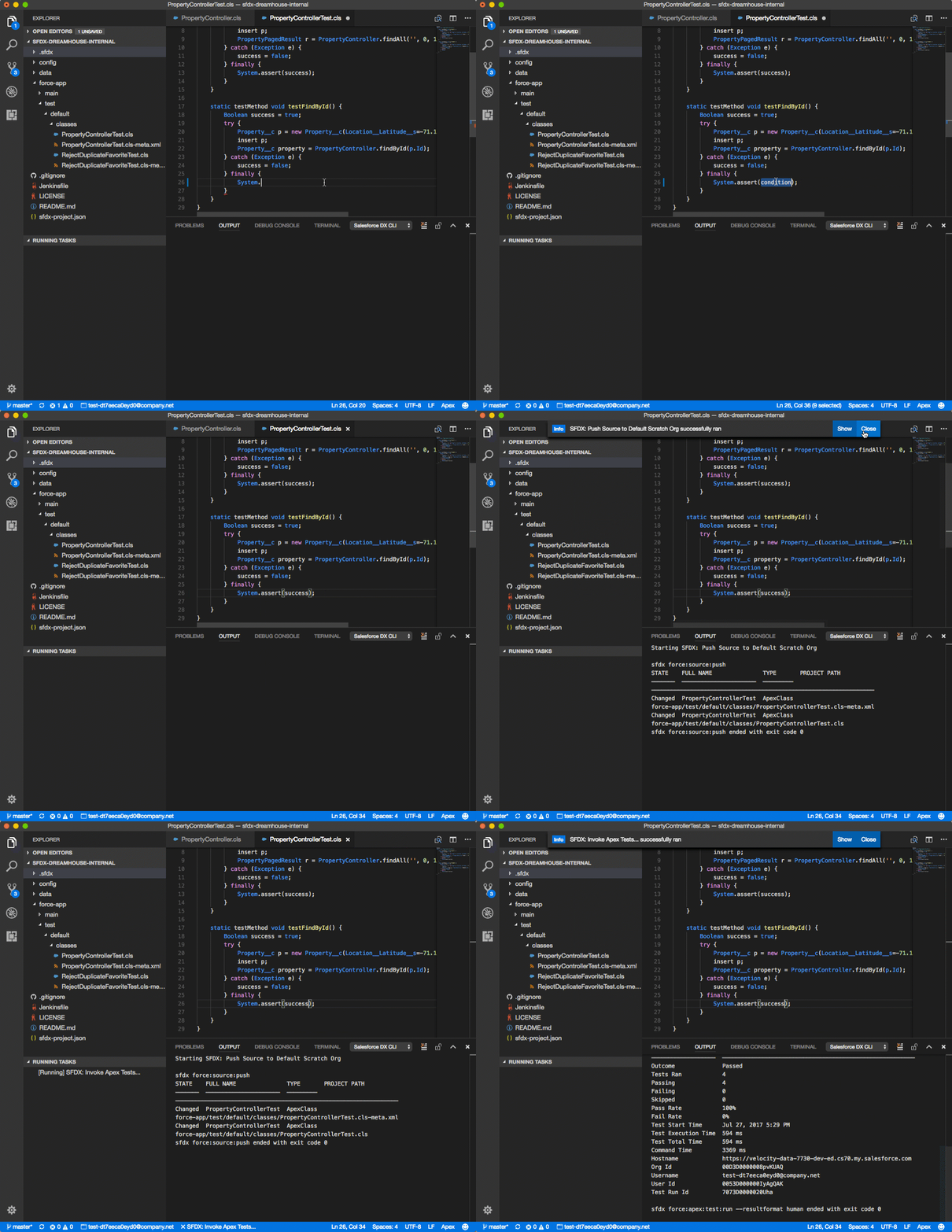
Image Credit: Visualstudio marketplace


Why?

In case you don’t know Salesforce is phasing out Force.com IDE (planned for June 2018) to promote newer IDE choices. There are already many IDEs out there to take Eclipse based Force.com IDE’s place. However, Salesforce is officially promoting Microsoft Visual Studio Code (aka VS Code) as official IDE.

What is VS Code?

VS Code is a platform-independent, light-weight and keyboard focused IDE for Salesforce (sorry for folks who loved menus and GUI). VS Code does have visual menus and options, however, using keyboard shortcuts is just do damn fast. There is surely some learning curve involved. But, once you get rolling, you would hate using mouse, as it takes a lot of work to raise your hand, move mouse, point and click and navigate, when you can just press “Ctrl + /” to comment current code selection.

VS Code features

  • Lightweight – In case  you have worked a lot with Eclipse, you might have noticed that it was a memory hogging tool. To much relief, VS Code is a comparatively very lightweight
  • Fast – I remember there were times in large projects, where we waited for minutes to allow Eclipse to load properly. Thankfully, with VS Code you would have minimum such encounters (if any). Primarily, due to it’s lightweight model and lazy loading of extensions, it ensure it’s just loading the things, that your project needs. Others, will be loaded on demand
  • Inbuild GIT capabilities – This was one of the most profound experience I’ve had in using GIT in a development IDE (others may have had better experiences). But, the sheer ease of using GIT within VS Code is ecstatic. Whether it’s about identifying current branch, items to pull from remote, items to push to remote server, files changed. It’s so ingeniously baked within user interface that you would wonder why it wasn’t done in other IDEs.
  • Intellisense - VS Code packs amazing intellisense capabilities, so you don't need to remember all variables or classes it displays a list of available values for you to choose
  • Shortcuts, Shortcuts and Shortcuts – VS Code is heavy on shortcuts and allow users to configure custom shortcuts to increase personalization.
  • Addons/ Plugins – like Eclipse, VS Code has a vibrant community of developers publishing plugins / add-ons to add more features to VS Code. There are plugins for almost all usual needs and specific needs as well
  • Platform Independent – VS Code supports Windows/ Mac/ Linux. This can be very helpful in particular when you have team members using different mix of machines
  • Language Agnostic – This is beauty. Doesn’t matter if you work on Lightning components, Apex, Visualforce, NodeJS, PHP, C# (obviously) or any other programming language/ technology, it is most probable supported (natively or extensions). So, no switching between different IDEs, when you are you have a backend NodeJS server running on heroku
  • Fast Coding and Refactoring capabilities – being the new kid on the block, VS code gets advantage of adopting time proven best practices, tips and tricks to ease day to day life of developers and help them become more productive. Common things like searching a particular text in all files, or paragraphs within in all files, or replacing variable name in entire class, it can be done like a breeze.

Myth vs Reality

  • It’s only for SFDX based projects – Well that’s a big misconception, something a lot of people have asked about. VS Code can be used for both SFDX and non SFDX based projects. It really boils down to the extensions you would choose.
  • It’s too complicated (no GUI) – it certainly has a learning curve for folks who have used GUI heavy IDEs. They can start by using available GUI / menu options. Also, as you'll find below, there are extensions which provide rich menu based development features (check Forcecode)
  • It’s too Dark – Unless you are afraid of darkness, dark theme helps in saving energy and your eyes. You can still choose to switch to one of many available themes

How to get started?

It’s simple. Follow these steps:
  1. Download and install VS Code
  2. Install plugins (you’ll need some plugins for Salesforce development)
  3. Get Started

Extensions (plugins) Recommendations

  • SFDX extensions - natively provided by Salesforce and officially supported. These tools are and should be foundational platform for all Salesforce extensions.
  • Forcecode - one of the most prominent Force.com development extensions on VS Code (at least prior to SFDX). I prefer it for conventional development, as it provides true IDE features like menu based retrieve, deploy, execute script, update on save etc. 
  • GitLens - parsing old git logs and commits can be tiring sometimes. GitLens solves this by providing intuitive features like inline commit view, last version comparison etc.
  • To-do Tree - if you utilize best practices of inserting to-do in code, for later reference, this extension can ease up the process of finding all todos 
  • Apex PMD - Static code analysis for your Apex and Visualforce code

Share:

Einstein AI Summit 2019

Listening to all of the hype, buzz, and predictions around Artificial Intelligence over the last few years, I’ve turned into the kid in the backseat of the car on the long road trip to Disneyland.
“Are we there yet? … Are we there yet?”
Well, kids, when it comes to Artificial Intelligence, we are there!
I got to see it up close and personal at Salesforce’s Einstein AI Summit in San Francisco this week. Only a select few Salesforce partners were selected to sit down with the individual product owners of the Einstein AI products and collaborate on how the products move forward. I was honored to be in the company of great Salesforce partners such as Accenture, Deloitte, Bluewolf, and DEG.
Here’s a list of the products where I was lucky enough to peek behind the curtain:
(Products we discussed)
Einstein Prediction Builder
Einstein Discovery
Einstein Next Best Action
Einstein Bots
Einstein Voice
Einstein Language
There were more features than I can list with each of these products, but here’s a few of the business problems these tools will help solve in the coming years…
Likelihood to Purchase, Repeat Business, Churn / Attrition, Next Best Actions, Equipment Up Time, Employee Attrition, Cost Reduction, Time to Close, Matching Candidates, Customer Lifetime Value, Margin
However, there are two that really stuck out to me. I believe they both will be absolute game-changers for many businesses who use Salesforce.
  • Einstein Discovery has been my personal favorite product to talk about so far, the possibilities with the tool is endless for a business user in Salesforce! A majority of the use cases above can be done through Discovery and the right type of information in Salesforce. Discovery is more than just a model builder; Discovery starts with trying to understand hidden details in your data and helping the business user make heads or tails of next steps. Have you looked at a spreadsheet or a dump of data and just not been able to get to the level of detail you’d like?
    • Discovery makes it easy to develop an understanding of what is happening with your data and then creates models to surface insights to your customer; such as how to improve the likelihood for an action to happen.
  • Einstein Bots is another great investment area in your overall customer experience. With Einstein Bots you can allow your customer an additional channel to quickly communicate with you; use cases span from customer service to FAQ. Einstein Bots gives you an easy UI to build conversational NLP bots that can be easily created and quickly iterated on.
    • One of the best features we walked through today was the Bot Training Game; this game allows you to take actual phrases a consumer says to your bot, that at the time weren’t understood, and train the bot on what the intent of the sentence was. This is HUGE! Not only do you learn what your actual customers are trying to say to you, but it takes the excel based labeling retraining game out of the picture.
Share:

Big Object in Salesforce | Difference Between Custom Object and Big Object

What is Big Object :-

Object that stores and Manages Massive data values within Salesforce Without affecting performance. Big objects provide consistent performance for a billion records, and are accessible with a standard set of API's to your org or external system.

Custom big objects can be created by the Metadata API. To define a custom big object, you need to create an object file that contains its definition, field's, and index, with a Permission-set to define the permissions for each field, and  package file to define the contents of the object metadata


What Should Consider for Big Object

1) You need to use Metadata API to create Big Object.
2) Max 100 Big objects per org
3) Support's Date Time,Lookup,Number,Text,Long Text Area Field only
4) triggers, flows, processes, and the Salesforce app are unavailable.
5) Async SOQL is included only with the licensing of additional big object capacity
6) Support only object and field permissions
7) Does not Count against org data Storage limit
8) Suffixed with "_b".


Difference Between Custom Object and Big Object


Custom Object
Big Object
Create
Manual and Metadata
Metadata
API Name
__c
__b
Track Activity
Yes
No Option
Field History Tracking
Yes
No Option
Data Type
All
Text, Date Time, Lookup, Number, Long Text Area
Edit Field
Yes
Yes
Delete Field
Yes
No
Trigger
Yes
No
Report
Yes
No
Storage
It Count Against Storage
It doesn’t count against Storage

Salesforce Big Objects

Was just experimenting with Salesforce Big Objects and found it quite interesting. It is mainly used for big data (100M+) analytics and mostly for asynchronous data crunching like Hadoop. However, there are very critical distinction before we go with Big Object.


  • Currently Big Object only support fields and permission, and that's about it
  • We can not have
    • triggers
    • page layouts
    • extensive SOQL (indexed SOQL is supported but that's extremely limited - and make sense as we are dealing with humongous data set)
    • no workflows, process builders, etc..
    • no reports
  • Basically it is completely non UI, and just for back end data stores for big data analytics - and that's about it.

Use case

In org, we can have survey on and Object record (e.g. Account, Opportunity, etc..), and would want to store those survey data in Big Object and later analyze it. 


How to user it :


1. Create Big Object

  • There is no User Interface to create the Big Object and its fields. We must use metadata API (using Ant Migration tool or workbench) to create such artifacts. Obviously, workbench makes it a lot easier.
  • Create object file 
  • Create permission set file
  • Create package.xml file
  • Nicely bundle them in .zip file and in right directory structure (you can download it from here)
  • Use workbench to deploy the .zip file and BigObject should like below
  • You can assign permission set (Survey_BigObject) to right user so they can query and update the data


  • Pay close attention to indexed fields, this is used for inserting records - identifying duplicates, and issuing synchronous SOQL queries. 

2. Insert Data

  • We can insert data just like we do in Apex for any other Object, or we can use Bulk API
  • There is no upsert operation, salesforce will automatically check the record being inserted against the indexed value, and if index values are same, then it will do update. otherwise insert.
  • Upon failure, there are no errors, we just need to look at saveResult or saveResults.

 Account a = [ select id, name from account limit 1 ];  
 Survey__b survey = new Survey__b();  
 survey.WhatID__c = a.id;  
 survey.WhatTime__c = System.today() + 1;  
 survey.WhatObject__c = 'Account';  
 survey.Question1__c = 'What is the rating';  
 survey.Answer1__c = '1';  
 Database.SaveResult saveResult = database.insertImmediate(survey);  
 System.debug( ' success ' + saveResult.isSuccess() + ' ' + saveResult );  


3. Query Data

  • Querying data is quite tricky with Big Object. Either you can query all records, which most probably is going to fail when we have millions of records
  • Or synchronous SOQL can only be issued against indexed fields. And also indexed fields must be in order in the query. See below for example:
 List<Survey__b> surveys = [ select id, WhatId__c, WhatObject__c, WhatTime__c, Question1__c, Answer1__c from Survey__b ];  
 for(Survey__b survey : surveys ) {  
   System.debug( survey );  
 }  
   
   
 System.debug(' -------------- indexed query -------------- ');  
 /** no gap is allowed and only indexed field in exact order can be used for query , we can skip but no gap is allowed, e.g. below  
 *  [select id from Survey__b] is fine  
 *  [select id from Survey__b where WhatID__c = :a.id ] is fine  
 *  [select id from Survey__b where WhatTime__c = :System.today() ] is NOT fine, as you can't jump to index2 without having index1 in the query.  
 * **/  
 Account a = [ select id, name from account limit 1 ];  
 List<Survey__b> surveys2 = [ select id, WhatId__c, WhatObject__c, WhatTime__c, Question1__c, Answer1__c from Survey__b where WhatID__c = :a.id and WhatTime__c = :System.today() ];  
 for(Survey__b survey : surveys2 ) {  
   System.debug( survey );  
 }  


4. Asynchronous SOQL


  • Asynchronous soql is only supported using Rest API
  • We have to provide asynchronous SOQL and then the custom Object to store the result
  • It seems like only one Async SOQL can run at any given time - at least in org I worked on

4.1 Create Custom Object To Store Async Result


  • Created suvey analysis object to store the analysis of the query with counts


4.2 Run Asynchronous SOQL

  • Below is how asynchronous SOQL looks like, we need to provide SOQL, and then target table and mapping between selected field and target table's field.
            
 {  
   "query": "select Question1__c, Answer1__c, count(whatId__c) c from Survey__B where WhatObject__c = 'Account' group by Question1__c, Answer1__c",  
   "operation": "insert",  
   "targetObject": "Survey_Analysis__c",  
   "targetFieldMap": {  
     "Question1__c": "Question1__c",  
     "Answer1__c": "Answer1__c",  
     "c":"Count__c"  
   }  
 }  

  • We can execute it using Rest API on Workbench


Share:

New To Salesforce (For Developers / Technical Track)


New to Salesforce.com and Force.com Platform

The New to Salesforce assists developers who are new to the Salesforce.com CRM and Force.com Platform understand the various cloud technologies, and create applications with Apex or Visualforce.

If you are a fresh or an experienced C# or Java developer and want to excel yourself in Salesforce.com CRM and Force.com Platform. Then below are the steps to learn basics of Salesforce.com CRM and Force.com Platform.

Step 1:
Learn below these terminologies because these are related to Salesforce.com CRM and Force.com platform.
  • What is Multi-tenant Architecture?
  • What is SaaS (Software as a Service)?
  • What is PaaS (Platform as a Service)?
  • What is IaaS (Infrastructure as a Service)?
  • What is DaaS (Development as a Service)?
  • What is Cloud Computing?
  • What is MVC (Model-View-Controller)?
  • What is CRM?
  • What is Sales, Marketing and Customer Service?
  • What are the benifits of CRM?
  • What is SFA (Sales force Automation)?
  • What is Campaign, Lead, Account, Contact, Opportunity, Product, Quote and Cases Management?
  • What is Lead Process?
  • What is Sales Process?
  • What is Support Process?
  • What is Sales Cloud?
  • What is Service Cloud?
  • What is Forecasting?
  • What is Reports &  Dashboards?
  • What is Salesforce.com?
  • What is Force.com?
  • What is Database.com?
  • What is Data.com?
  • What is Work.com?
    Step 2:
    Learn below mentioned guides to get knowledge of Salesforce / Force.com Development (configuration and customization).


    Force.com Platform Fundamental
    http://developerforce.s3.amazonaws.com/books/Force.com_Fundamentals.pdf

    Analytics Workbook
    http://www.salesforce.com/us/developer/docs/workbook_analytics/workbook_analytics.pdf
    http://www.salesforce.com/us/developer/docs/workbook_analytics/index.htm

    Apex Workbook
    https://developer.salesforce.com/docs/atlas.en-us.apexcode.meta/apexcode/apex_dev_guide.htm

    Visualforce Cheat Sheet
    https://na1.salesforce.com/help/doc/en/salesforce_visualforce_developer_cheatsheet.pdf

    Visualforce Workbook
    http://www.salesforce.com/us/developer/docs/workbook_vf/workbook_vf.pdf
    http://www.salesforce.com/us/developer/docs/workbook_vf/index.htm

    SOQL (Salesforce.com Object Query Language)
    http://www.salesforce.com/us/developer/docs/soql_sosl/index_Left.htm#StartTopic=Content/sforce_api_calls_soql.htm
    http://www.salesforce.com/us/developer/docs/soql_sosl/salesforce_soql_sosl.pdf

    SOSL (Salesforce.com Object Search Language)
    http://www.salesforce.com/us/developer/docs/soql_sosl/index_Left.htm#StartTopic=Content/sforce_api_calls_sosl.htm
    http://www.salesforce.com/us/developer/docs/soql_sosl/salesforce_soql_sosl.pdf

    Apex Governor Limitations
    http://www.salesforce.com/us/developer/docs/apexcode/index_Left.htm#StartTopic=Content/apex_gov_limits.htm


    AJAX Toolkit Developer's Guide
    http://www.salesforce.com/us/developer/docs/ajax/index.htm
    http://www.salesforce.com/us/developer/docs/ajax/apex_ajax.pdf

    Apex Code Developer's Guide
    http://www.salesforce.com/us/developer/docs/apexcode/salesforce_apex_language_reference.pdf

    Visualforce Developer's Guide
    http://www.salesforce.com/us/developer/docs/pages/salesforce_pages_developers_guide.pdf

    Salesforce.com Limitations
    https://na1.salesforce.com/help/doc/en/salesforce_app_limits_cheatsheet.pdf

    Step 3:
    Learn below mentioned guides / helpful links to get knowledge of Salesforce / Force.com Deployment.

    Change Sets
    http://help.salesforce.com/help/doc/en/changesets.htm
    http://na4.salesforce.com/help/doc/en/changesets_best_practices.htm

    Force.com IDE or Eclipse
    http://wiki.developerforce.com/page/Force.com_IDE

    Force.com Java Ant Migration Tool
    http://www.salesforce.com/us/developer/docs/daas/index.htm

    Development Lifecycle Guide (Enterprise Development on the Force.com Platform)
    http://www.salesforce.com/us/developer/docs/dev_lifecycle/salesforce_development_lifecycle.pdf
    http://www.salesforce.com/us/developer/docs/dev_lifecycle/index.htm

    Step 4:
    Learn below mentioned guides / helpful links to get knowledge of ETL (Extract-Transform-Load) tools used in Salesforce / Force.com data integration and data migration.

    Apex Data Loader
    http://www.salesforce.com/us/developer/docs/dataLoader/index.htm
    https://na1.salesforce.com/help/doc/en/salesforce_data_loader.pdf

    Apex Scripted Data Loader
    http://www.salesforce.com/us/developer/docs/dataLoader/index.htm
    https://na1.salesforce.com/help/doc/en/salesforce_data_loader.pdf

    Jitterbit Data Loader for Salesforce
    A free, third-party data migration tool that lets administrators automate the import and export of data between flat files, databases, and salesforce.com.
    https://appexchange.salesforce.com/listingDetail?listingId=a0N300000016ZoVEAU

    Dell Boomi
    (CSV,  SQL Server, MySQL, CRM Dynamics, Salesforce,  WebService, SAP etc.)
    http://www.boomi.com/

    Dataloader.io
    No download, free data loader for Salesforce. Leverage keyboard shortcuts for object lookups and data mapping. No security token required.
    https://appexchange.salesforce.com/listingDetail?listingId=a0N30000009w8ZBEAY

    Informatica Cloud Data Loader for Salesforce
    Informatica Cloud Data Loader for Salesforce is a FREE data loading application that automates the import/export of Salesforce and Force.com data between databases and files.
    https://appexchange.salesforce.com/listingDetail?listingid=a0N300000016cUTEAY

    On-Demand IDE (Developer Console)
    A browser-based collection of tools you can use to create, debug, and test applications in your Salesforce organization.

    On-Premise IDE (Force.com IDE)
    Eclipse plugin for developing Force.com applications, providing source code editors, test execution tools, wizards, and integrated help.
    http://wiki.apexdevnet.com/page/Apex_Toolkit_for_Eclipse

    Force.com Migration Tool
    A Java/ANT-based command line utility for scripted deployment of application metadata.
    https://cs10.salesforce.com/dwnld/SfdcAnt/salesforce_ant_28.0.zip

    SOQL / SOSL IDE (Force.com Explorer)
    .NET-based tool for inspecting schema, and building and testing SOQL queries.
    http://wiki.apexdevnet.com/page/Apex_Explorer

    For Mac users, SoqlXplorer provides metadata exploration, a SOQL query tester, and a graphical schema view for examining object relationships (a piece of functionality that's only available on the Mac OS X platform!). Download SoqlXplorer from Simon Fell's PocketSOAP website at www.pocketsoap.com/osx/soqlx. After the download automatically extracts itself, drag the SoqlXplorer icon to your Applications folder to complete the installation.
    www.pocketsoap.com/osx/soqlx
    For other great Salesforce.com tools and utilities built exclusively for Mac OS X, see www.pocketsoap.com/osx.

    Other Helpful Resources:
    All Salesforce documents available here at
    http://wiki.developerforce.com/page/Documentation
    Share:

    Recent Posts